Feature Release 4.1.10062.0 (August 2026)
This feature release brings together the changes since 4.1.10056.0. Highlights include easier template editing and direct access to directory data, alongside improvements to document output and the Office add-ins.
Highlights
Edit fields more comfortably
The Fields editor marks invalid input directly. Global code references can be maintained in the simple view. References to existing global field configurations can be added and inspected in a read-only preview. Comments and readable code blocks are retained when switching views. Documentation.
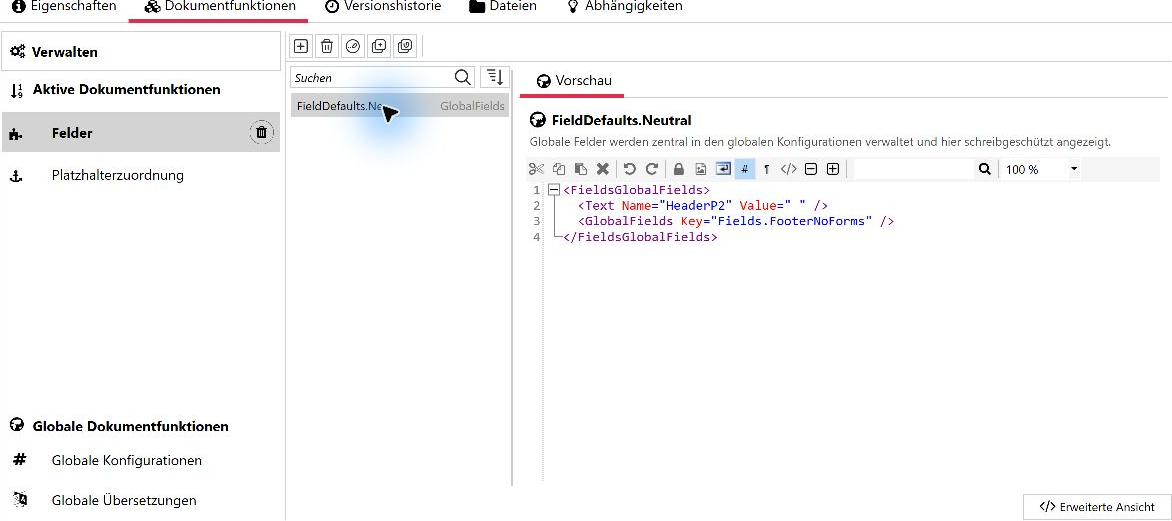
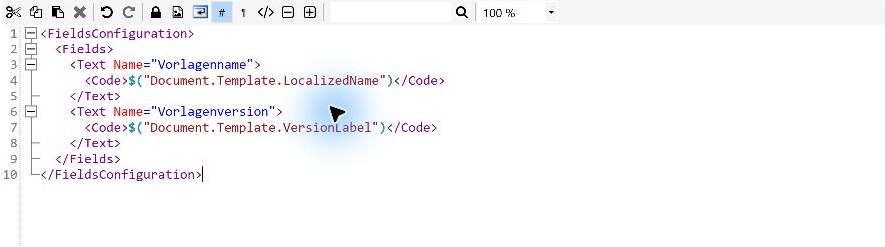
Include template information in documents
Template names, version labels and other metadata can be used in fields, for example to identify the source template in a footer. Documentation.
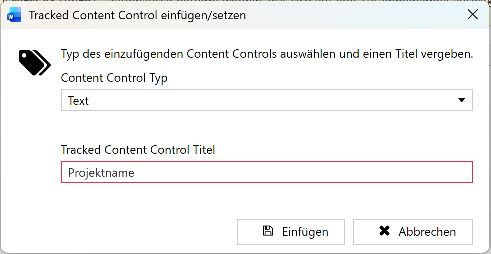
Insert Quick Check fields
Content controls to be checked can be inserted or marked from the Template editing group in the primedocs ribbon in Word. These controls are also retained in Word snippets. Documentation.

Load form data from LDAP directories
Forms can use data directly from LDAP and LDAPS directories such as Active Directory. In a local domain, the process account can be used without separately configured credentials. Documentation.
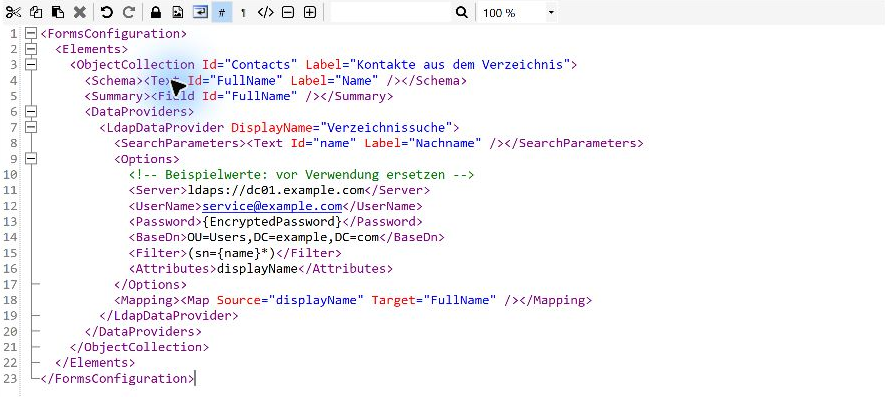
Example with an explicit LDAPS server and service account. In a local domain, the server, credentials and search base can be omitted and are determined automatically. Use LDAPS when supplying explicit credentials.
All changes
Web app
New
- Live preview. Next to the preview image, Word, Excel and PowerPoint templates can switch to Live preview. The document is generated with the entries in the form and shown as PDF, also across several pages. For e-mail templates and in Connect mode the preview image remains. Documentation.
Improved
- Protect entries from accidental dismissal. Clicking outside an object dialog with unsaved changes now asks for confirmation. Esc, Cancel and the close button still dismiss the dialog directly.
Fixed
- Show relevant templates. Templates and folders intended exclusively for Outlook no longer appear in the web app.
Office add-ins
Fixed
- Preserve Word formatting during updates. Styles and paragraph formatting are retained in headers, footers and tables. Unwanted extra empty paragraphs are prevented.
- Edit and check date fields more reliably. Invalid dates entered manually no longer block the properties dialog. Quick Check recognises completed dates using their configured format, and PowerPoint design conversion handles additional date formats.
- Recognise errors in template actions. Problems loading template data are now reported visibly. Document update errors are identified as such.
- Access tools in narrow side panes. Tools that no longer fit in the Word or Outlook snippet pane remain available through an overflow menu.
- Use SVG images reliably in PowerPoint. Presentations with bound SVG images can be updated when inserting slides or changing profiles and languages.
- Keep primedocs accessible in PowerPoint. The primedocs tab remains visible after the last presentation is closed.
- Correct chart colours. Labels and other chart elements in PowerPoint and Excel use the intended theme colours.
- Apply email recipients and signatures reliably. Contacts without an email address no longer prevent the email template from supplying recipients. Default signatures are also inserted in plain-text emails.
- Update choice labels when changing language. Translated choice labels in Word follow the document language.
Templates and document creation
New
- Include template information in documents. Template names, version labels and other metadata can be used in fields, for example to identify the source template in a footer.
- Set image dimensions in Word. Width and height can be configured in the template. Setting only one dimension preserves the aspect ratio.
- Insert Quick Check fields. Content controls to be checked can be inserted or marked from the Template editing group in the primedocs ribbon in Word. These controls are also retained in Word snippets.
- Load form data from LDAP directories. Forms can use data directly from LDAP and LDAPS directories such as Active Directory. In a local domain, the process account can be used without separately configured credentials.
Fixed
- Validate required input reliably. Required parameters are checked before data searches. Missing required values in conditional form sections prevent confirmation when the section is active.
- Handle external form data more robustly. Invalid yes/no values are reported without closing the search dialog. Objects and object lists from Connect can be processed more reliably by the code data provider.
- Retain headers and footers in Excel PDFs. Worksheets without cell content retain their headers and footers during server-side PDF conversion.
- Preserve spaces in formatted text. Spaces between adjacent inline text sections are retained when processing HTML.
- Allow output with hint fields. Hint fields combined with output fields or a follow-up document target no longer cause output to fail. This applies to batch output, dispatch and server-side output through Connect and the Web API.
Administration
Improved
- Record active client versions more precisely. Office, Outlook and Teams web add-ins and the SharePoint extension are recorded as distinct client types. Newly deployed manifests also report their version.
Fixed
- Import packages more reliably. Repeated uploads of the same package remain readable. Imports correctly handle missing optional snippet permissions, existing parent groups, and previously deleted global configurations and translations.
- Track template modification dates. Uploading a replacement template file also updates the displayed modification date.
- Apply privacy settings during document generation. The setting that disables personal usage data now also applies to documents generated on the server.
Integration and interfaces
New
- Notify embedding applications. Connect can send configurable messages to the host web application when a session completes, is cancelled or fails.
Improved
- Configure file uploads more easily. When transferring generated files, primedocs supplies missing file extensions and content types based on the output format. Explicit settings are retained.
Fixed
- Integrate with clearer API feedback. API documentation shows valid parameter values. Invalid requests and missing objects return appropriate HTTP status codes, and MCP connection information respects the installation path.
- Handle Connect session startup errors correctly. Generic HTTP 400 responses are handled correctly instead of causing an additional unhandled error.
- Clean up Exchange configuration. The already ineffective
IgnoreSsloption of the Exchange address provider has been removed.
Desktop client
Improved
- Edit fields more comfortably. The Fields editor marks invalid input directly. Global code references can be maintained in the simple view. References to existing global field configurations can be added and inspected in a read-only preview. Comments and readable code blocks are retained when switching views.
- Write configurations faster. Autocompletion supports local fields, object fields and additional field references. Element and attribute suggestions are more reliable, and existing XML closing tags are no longer inserted twice.
- Find configuration errors earlier. Validation includes referenced global code and global form summaries. Messages about unknown functions, missing configurations and invalid snippets help locate the problem.
- Protect unsaved changes. Discarding changes now requires confirmation. Fully reverting changes using Undo clears the modified indicator.
- Compare support information directly. The help area shows whether primedocs and Office use 32-bit or 64-bit installations.
Fixed
- Run batch output and dispatch more reliably. Globally stored form elements no longer prevent batch output. Rows in the dispatch dialog can be copied and moved, and read-only choice fields remain locked. Previously, changes made in those fields could be written back to the document.
- Use profiles and form labels correctly. Translated colour themes and preselected organisational units are applied correctly. The warning banner no longer allows changes to the organisational unit of another user’s shared profile.
- Display complete SVG previews. Graphics are no longer clipped at the edges in affected desktop client, PowerPoint and Outlook views or when inserting images in Word.
Operations and installation
Improved
- Update logging configuration during server upgrades. Changed logging configurations can be replaced or retained during an upgrade. A backup is created before replacement.
- Faster field synchronisation. Retrieval of field definitions and field values has been optimised.
Fixed
- Manage user synchronisation more reliably. Assigning a directory account to a user in the desktop client through “Assign AD user” requests synchronisation of that user. This also includes users previously excluded from synchronisation. A failed source no longer produces a contradictory success report.
- Strengthen installation and user synchronisation. The installer respects the operating system’s TLS settings and creates the application pools as 64-bit. A server upgrade additionally switches existing pools to 64-bit. Further fixes address the directory service queries used during user synchronisation.
Important notices
More comprehensive validation may reveal previously undetected errors in global form summaries. Check affected templates before deployment. Spaces between inline HTML elements are now preserved, which can change the output of existing templates.
Some invalid requests and missing objects now return HTTP 400 or 404 instead of 500. Review integrations that rely on these status codes. MCP callback addresses must match an accepted registration.
The privacy correction applies to new usage records. Existing records are not cleaned up automatically. If a cleanup is needed, coordinate it with support.
The upgrade script compares each application’s NLog.config with the version from the upgrade package. If they differ, an interactive upgrade asks per application whether to replace the file (after creating a backup) or keep it. Automated upgrades (-Force $true) retain the existing file as before and emit a warning for each affected application. With -ReplaceNLogConfig $true, the file is replaced automatically instead. Details: Update primedocs server.