Feature Release 4.1.10056.0 (July 2026)
The second feature release of the primedocs 4.1 line on the way to the 2026 H2 release. It centres on automatic sign-in (SSO) across all clients, document classification with Microsoft Purview, crisp vector graphics (SVG), a substantially extended primedocs Connect, and data-driven forms, complemented by many improvements and fixes across all areas.
Highlights
Automatic sign-in (SSO)
Users no longer have to sign in manually: if a valid Microsoft Entra ID session already exists, primedocs starts in the signed-in state, without a «Login» click and without a sign-in window. This applies to the web app and the desktop client, and now also to the embedded Office add-in and Microsoft Teams. The biggest gain is in Outlook, where signing in used to be the most tedious. A deliberate logout is respected. If Microsoft cannot perform the silent login, the familiar interactive login appears. Setup and behaviour are described in Single Sign-On (SSO) (see also Important notes).
Classify documents automatically (Microsoft Purview)
Sensitivity labels from Microsoft Purview can now be applied directly during document creation. The labels the respective user is entitled to are offered as a choice in the form. primedocs applies the chosen label to the document server-side, before the file physically exists. This works for Word, PowerPoint and Excel and without a local add-in, so documents generated in the background are also correctly classified from the start and, if the label requires it, encrypted. The visual representation (e.g. watermarks) is handled by Office based on the label. The configuration is described in Microsoft Information Protection (MIP) (see also Important notes).
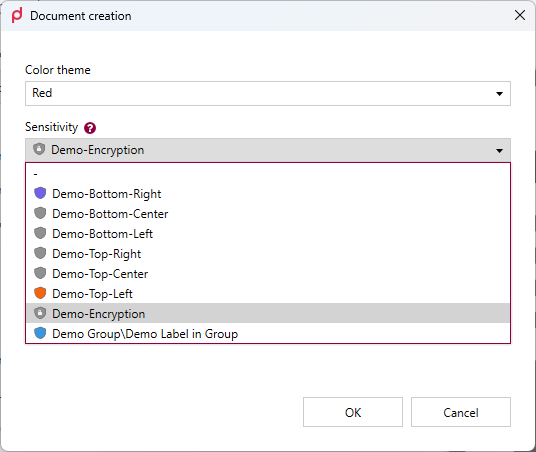
Choosing the sensitivity label during document creation in the desktop client.
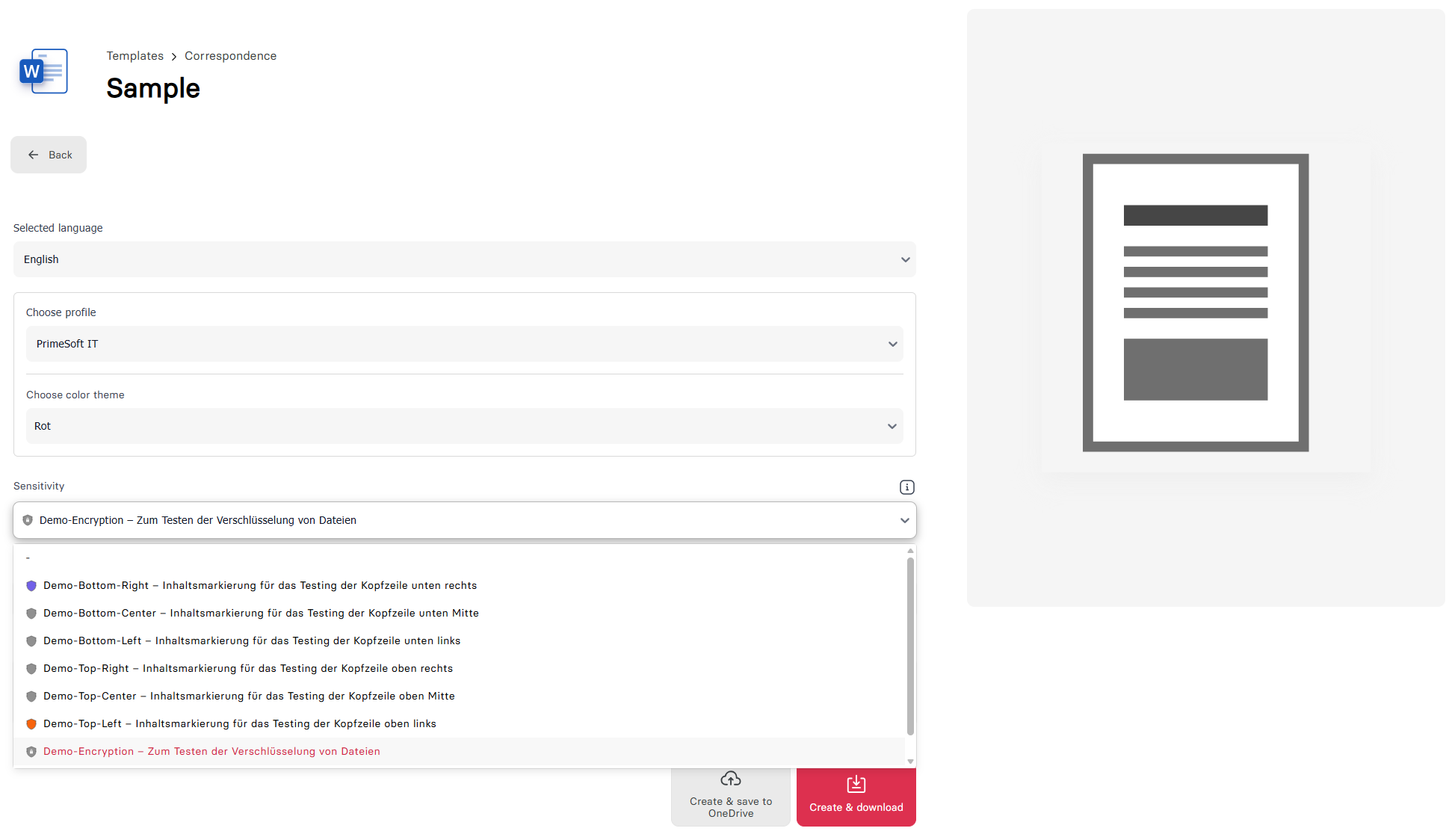
The same choice in the web app.
Crisp logos and graphics with SVG
primedocs now supports vector graphics (SVG) so that logos, icons and pictograms stay razor-sharp at any size and in print instead of pixelating. SVG can be stored in organization and user fields (fields, e.g. logos, profile pictures) and uploaded to the image gallery, which additionally accepts WMF and EMF. For Office compatibility, primedocs embeds every vector graphic together with a high-resolution PNG fallback: Office 2019 and newer render the vector graphic natively crisp, older versions show the PNG fallback. Vector embedding applies to Word and PowerPoint. In Outlook signatures and in Excel headers and footers the SVG is converted to a PNG, as Office does not support vector graphics there.

Before: a logo stored as a raster image (PNG) becomes blurry when zoomed in.
After: stored as a vector graphic (SVG), the same logo stays razor-sharp at any size.
primedocs Connect: integration without the Connect format
Third-party systems can now be integrated without having to produce the Connect format themselves. When a template is opened via a link, primedocs fetches the required data itself: the new ConnectSessionTemplate uses an initializer to automatically retrieve data from external sources, maps it onto the form fields, and starts the wizard prefilled. The calling system only has to pass a link with a few parameters (e.g. a document ID). All the integration logic lives in the template. In addition, Connect can now return the generated document directly as a PDF server-side, with correctly embedded profile and organization images. The first productive use case is integration with records-management (GEVER) systems.
Data-driven forms from any data source
Forms can now supply entries through freely definable logic while ensuring that authoritative data stays unchanged. To do so, the CodeDataProvider runs a JavaScript snippet that provides the entries: computed, filtered by the newly supported search parameters, or from arbitrary custom logic. Optionally, this snippet can also access the data context of a Connect call ($("Data.…")) and offer the delivered data as a filtered choice list. For all data interfaces: fields can be set read-only (ReadOnly), and manual creation of entries can be disabled (DisableManualCreate) when the data source is authoritative. Objects and object collections can also be nested.
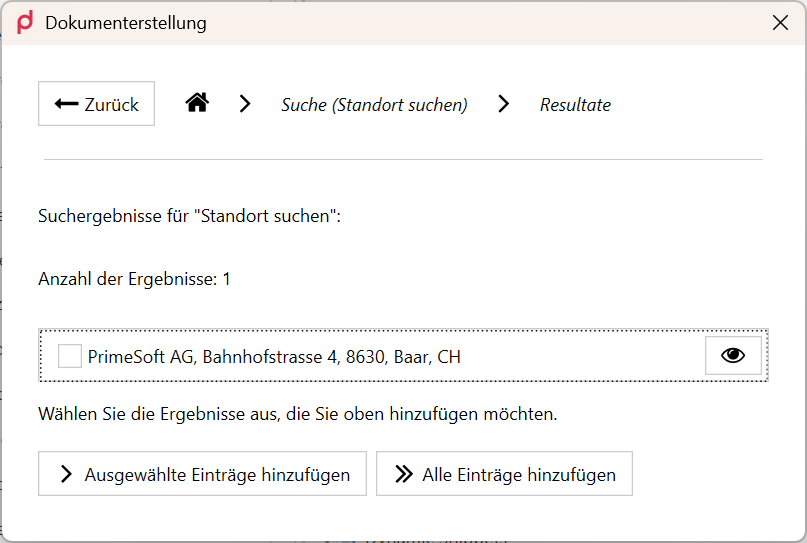
The CodeDataProvider searches the data supplied with the Connect call and shows a filtered selection.
New documentation platform
You are reading these release notes on the new documentation platform at docs.primedocs.io, which went live during this release. The content is separated by product version (4.0 / 4.1), available in German and English, and complemented by fast search and a dark mode.
The new documentation platform at docs.primedocs.io, embedded live right here.
All changes
Web app
New
- Automatic sign-in (SSO): With an existing Microsoft Entra ID session, the web app signs in automatically, with a fallback to the interactive login.
- Search history: Recently searched terms are offered directly and can be navigated with the arrow keys.
Improved
- Clearer connected services in the dialog: Connected-service actions appear as a single action button. A required login is detected in advance and shown with a shield icon, instead of only at generation time.
- Default language during document creation: The default language chosen in the user settings is respected during document creation.
- Template changes take effect immediately: Changes to templates are active right after saving. An app restart is no longer needed.
Fixed
- Stable profile-picture upload: An oversized profile picture led to an error page and the loss of unsaved changes. Image uploads are now checked for size in advance (warning or rejection), and the form stays usable.
- Reliably remove and reset profile pictures: Removing a profile picture and resetting to the inherited image now behave consistently, for example for functional mailboxes without a signature image.
- UI polish: Various display fixes, including duplicate scrollbars in dropdowns, hover and centring of the «Back» button in dark mode, and consistent icon colours in light and dark mode.
Office add-ins
New
- Sensitivity labels (Microsoft Purview): Apply sensitivity labels directly during document creation, permission-filtered and applied server-side, for Word, PowerPoint and Excel.
Improved
- «Convert design» in PowerPoint: Non-placeholder elements (charts, tables, images, text boxes) are scaled proportionally to the target template's slide size and no longer extend beyond the slide edge. The aspect ratio is preserved.
- Faster snippets with charts: Creating and editing chart snippets was delayed by around 10 seconds. The process is now as fast as for other snippet types.
Fixed
- Signature on early recipient entry (Outlook Web/New): If an internal recipient is entered before the add-in has finished loading, the correct internal signature is now set reliably instead of the external default signature.
- Enable auto-signature after the fact (Outlook Classic): If the auto-signature checkbox in the ribbon is enabled later, an already inserted signature is now updated correctly.
- Signature with functional mailboxes (Outlook Classic): The template flag «disable signature» is now also respected when the sender is switched to a functional mailbox.
- «Extract slides» saves the right presentation (PowerPoint): «Extract slides» now saves the extracted slides instead of the source presentation. In the send dialog, «Send» is the default action.
- Protected files with view-only rights (PowerPoint): Purview-protected files crashed for users with view-only rights. This case is now handled.
- Hint instead of error when binding: If no placeholders are available to bind, a clear message now appears instead of an error.
- «Bind field» in foreign content controls (Word): If the cursor sits in a content control that was not created by primedocs (for example a picture control inserted via the Word developer tools), «Bind field» no longer fails. In a rich-text control without primedocs markers, a nested content control is now inserted. For other types (picture, plain text, date) a clear message appears.
- Snippets without an open document (Word): Inserting a snippet without an open document now ends in a controlled way instead of crashing Word.
- Create a «plain text» snippet: The OK button stayed disabled when creating one. This has been fixed for Word and Outlook.
- Content controls in headers and footers (Word): Updating address content controls in body text and header/footer crashed when a dependent inner element had already been removed. This has been fixed.
Templates & document creation
New
- Vector graphics (SVG) in image fields: SVG for organization, user and profile pictures, WMF/EMF in the image gallery, with an automatic PNG fallback for older Office versions.
- Logic-based data lists with the CodeDataProvider: The CodeDataProvider runs a JavaScript snippet to provide entries and now supports search parameters as well as optional access to the Connect data context (
$("Data.…")). Fields can be set read-only (ReadOnly) and manual creation of entries can be disabled (DisableManualCreate). - Dynamic snippets with the DynamicSnippet: The new field type provides snippets that depend on the full data context of the document (form input, profile, language) and update automatically when the form, profile or language changes. They appear in the snippet pane in the «Dynamic snippets» group and optionally as an AutoText. The feature is available in Word.
- Nested objects in forms:
ObjectandObjectCollectioncan now be nested insideObjectandObjectCollection. - Protect or hide fields: Forms value elements (text, choice, YesNo, date) can be protected via
ReadOnlyor hidden viaHidden. Prefilled fields stay visible but non-editable, and pure data fields stay hidden. - Date and choice fields in Excel headers/footers: Excel headers and footers can now also bind date and choice fields (previously text only). An undefined field produces a more meaningful message.
- Dynamic table rows as snippet placeholders:
WordTableRowsgenerated via the builder can now be passed as snippet placeholders. - Inherit keyboard shortcuts from styles: A style template now passes its Word keyboard shortcuts on to the templates based on it. The option can be set independently of the Style Pane Options. Only shortcuts whose style is present in the generated document are inherited.
- Info text as a link: An Info element in the form can be rendered as a clickable hyperlink via
Linkortranslate-Link. OnlyhttpandhttpsURLs are accepted. On the web the link opens in a new tab, in the desktop client in the default browser.
Improved
- Non-blocking required-field validation: A required field not supplied by a data interface no longer blocks the whole search. Results are loaded, missing required values are highlighted, and only the final confirmation stays disabled. Applies in the web app and desktop client.
- Foreign table content elements are preserved: When cleaning WordContent, TableRow content controls not created by primedocs are preserved. Table structure and locked content are not lost.
- Foreign content controls on insert: Subset documents with foreign
primedocs.Fieldtags can be inserted via WordContent again. Foreign content elements are removed instead of blocking generation. - «Test configuration» shows real values: Missing serializers and validation gaps in several global-configuration modules (including Output, SuccessorDocument) are fixed. The test view shows the actual configuration.
Fixed
$.createAutoMapping()with dot notation: The resolution order is corrected, so the automatic placeholder mapping now also works for field names with dot notation.- Snippet blocks in non-updatable WordContents: A WordContent with
word-UpdateBehavior="Disable"containing a SnippetBlockPlaceholder could not be updated correctly. The sporadic «Object has been deleted» error is also fixed. - List formatting on insert: Inserting content with list formatting raised an exception when the numbering part was empty. This case is now handled robustly.
- Hidden table rows stay hidden: Table rows hidden via a flag became visible again (without content) after saving and reopening. Hiding is now permanent.
Administration & web admin
New
- Snippet metadata via the Admin API: Metadata of individual snippets (name, key, sort order, permissions, localizations) can be read and changed via the Admin API, as a foundation for snippet management in the web admin.
Improved
- Faster loading of the admin dashboard: The health-check path on initial load was relieved. The dashboard opens noticeably faster, especially with many data sources.
Fixed
- Snippet export of the selected entries only: Previously all snippets in the folder and its subfolders were exported. Now only the explicitly selected entries are exported.
- Snippet usage in Outlook Classic templates: The snippet-usage evaluation now also recognizes snippets used in Outlook Classic templates.
- Package import no longer reports false changes: The blob comparison on import now uses the virtual path and no longer reports spurious changes.
- Export of very large databases: The ZIP export of databases above 1 GB no longer aborts with a memory error.
- Paged loading of the administration lists: Paging through the lists for users, groups, roles, organization units, app user groups and snippet groups now runs entirely on SQL Server instead of in the web API's memory, which noticeably relieves large data sets. In addition, the ordering is stable across page boundaries, so no entry appears twice or goes missing.
- Clear feedback for the DACPAC export: If a background job is missing, a clear message now appears instead of an internal error.
Integration & interfaces
New
- Connect returns a PDF server-side: primedocs Connect can return the generated document directly as a PDF, including embedded profile and organization images.
- ConnectSessionTemplate with data preloading: When a template is opened, data from third-party systems is loaded automatically and form fields are prefilled.
- Update documents server-side (
/Update): An existing document created with primedocs can now be updated server-side via Connect, with optional PDF output and a language override. Values that are not supplied are kept. The document is passed as multipart, as Base64 inside the Connect XML, or via an approved remote source. Updating documents describes the functional details. - Skip the form dialog on Connect: With
HideDialogOnConnect="true", the form dialog is skipped on Connect calls, and validation runs directly. - Manage organization-unit permissions via API: The Admin API now supports managing access permissions for organization units (read, add, remove).
- Info page for the MCP server: The MCP service now provides an anonymously reachable info page listing the available MCP tools, so it is easy to tell whether the service is running.
Fixed
- Date format in server-side PDFs: Data-bound date fields are now formatted according to the document language instead of the server language.
- More reliable Connect commands: The order and error handling of Connect commands (dialog display, cancellation, errors on output fields) work correctly.
- Wrong data formats from third-party systems: If an external system supplies values in the wrong format (e.g. «Yes» instead of a boolean), they are now checked or ignored on load instead of failing only at generation time.
- Update instead of create a document (legacy Connect): If a storage location exists, the legacy Connect updates an existing document instead of creating a new one («add data later» from records-management systems).
- Key per data source for connected services: The symmetric key is now loaded fresh per data source. Connected services and server-side Connect sessions work reliably in environments with multiple tenants.
- Template permissions on the template query:
/Connect/Templatesnow honours the using permission of the target user and their directory groups. Previously, templates could be returned that the target user had no permission for. The endpoint is therefore consistent with the template library (see Important notes). - Technical users in multi-tenant environments: Calls to the Connect and Common endpoints with a technical user (client credentials) no longer fail with an internal error in environments with several tenants. The tenant database is determined by the
datasourceIdin the call path. Endpoint authorization remains unchanged.
Desktop client
New
- Automatic sign-in (SSO): Automatic login with an existing Entra ID session, with a fallback to the interactive login.
- Desktop and server version in the help area: The help area shows the desktop and server version together, so support is not accidentally given the wrong version.
- Forms test-data generator: When testing a template, one click fills all form elements with sensible test values (text, choice, yes/no, date, single and collection objects) to speed up layout and logic tests.
Improved
- XML editor: The editor recognizes self-closing elements correctly and marks attributes in autocomplete as required or optional.
- Global-configuration validation: Circular references are detected, duplicate IDs and XML errors are no longer reported multiple times, «Test document» and «Test configuration» are more consistent, and «Test configuration» is disabled while there are unsaved changes.
- Faster search with very many templates: Search in the client is significantly faster for very large template inventories.
- Hints for the DomainFilter: The DomainFilter gets an explanatory tooltip, and a note marks the setting relevant for «Classic».
Fixed
- More stable sign-in and sign-out: Errors after repeatedly signing out and in are fixed, SSO is more reliable and logs more information. Unexpected sign-outs at irregular intervals, after which the client sometimes stayed signed out for a longer period, are fixed as well: the stored session is now the authoritative source, sign-in, renewal and sign-out are serialized even across several primedocs instances open at the same time, and transient disruptions such as network errors or a briefly unreachable sign-in no longer end the session. It is only ended when the sign-in is genuinely invalid.
- MySQL address sources without an installed provider: A SQL address source configured against MySQL no longer reports an unspecific error when the database provider is not registered on the workstation. The
MySqlConnectorprovider now ships with the client, provider names are resolved case-insensitively, and a meaningful message appears if the configuration is missing or the provider is unknown. Existing configurations using the older provider name continue to work unchanged. - Attribute completion in the XML editor: Completion now suggests the attributes of the element whose start tag contains the cursor, instead of the root element's attributes everywhere. By design, no suggestions appear inside CDATA and JavaScript blocks any more.
- Import of invalid preview images: If the content of an image file does not match its extension (for example a PowerPoint file renamed to
.xps), the client no longer crashes when importing a preview image in the template editor. A clear error message appears instead. - Search by template ID: Searching for a template ID stored in the template details crashed the client. This has been fixed.
- Additional profiles without permission: Additional profiles with revoked permission are cleanly skipped during document creation instead of raising a blocking error.
- Roles are preserved when copying a profile: When copying a profile, the roles assigned to additional profiles are preserved, so role-based preselection (
PreselectByRole) also works for copied profiles. - No empty form dialog: Templates without form fields (e.g. PowerPoint presentations) no longer open an empty form dialog.
- Less load on parallel startup on terminal servers: Starting many sessions at once caused critical CPU load spikes. Initialization has been eased.
Operations & installation
Improved
- More efficient synchronization: The blob sync now loads only data that actually changed, relieving the SQL Server considerably.
Fixed
- Health monitor reports address providers correctly: After the move to .NET 10, health monitors reported «no available address providers». The missing dependency is now shipped along, and the health status is correct again.
- Automatic offboarding of disabled users: Users that still exist in the directory service but are disabled there are no longer flagged for deletion. Only users that were not found in the directory service are flagged now (see Important notes).
- More robust user synchronization: Three faults in the synchronization logic are fixed. For the HTTP data source, a configured Windows domain was not applied, so authentication happened without the domain. For LDAP/AD, filter values are now escaped according to RFC 4515. A missing property while mapping claims no longer aborts the synchronization job.
Important notes
This feature release contains no breaking changes. Two new features require a one-time configuration before they can be used, and two fixes change existing behaviour:
Automatic sign-in must be configured per organization in Microsoft Entra ID. If it is not configured or fails, the familiar interactive login applies as before.
Classification with Microsoft Purview requires the Microsoft Graph API connection to be set up. The primedocs support team can help with the setup.
/Connect/Templates now checks the using permission of the target user. Templates that were previously returned despite a missing permission no longer appear in the response. Review integrations that rely on the previous scope of the response before updating.
Flagging for deletion now strictly requires that the user was not found in the directory service. Users that exist in the directory but are disabled are therefore no longer deleted automatically. To remove disabled users deliberately, do so via the directory or manually in primedocs.