Feature Release 4.1.10020.0 (April 2026)
The first feature release of the primedocs 4.1 line on the way to the 2026 H2 release. It centres on the new Dispatch Manager, sending slides from PowerPoint via Outlook (New), role-based additional profiles, and a much leaner snippet workflow, complemented by many improvements and fixes across all areas.
Highlights
Dispatch under control: the new Dispatch Manager
Documents with multiple recipients now practically distribute themselves: the new Dispatch Manager dialog in the desktop client reads the recipients directly from the document and lets you assign them to targets such as labels or envelopes. primedocs generates bundled files per target and stores them in a structured way. Printing included if you wish: assign a physical printer per target, documents go straight to the right devices, and the printer selection is remembered.
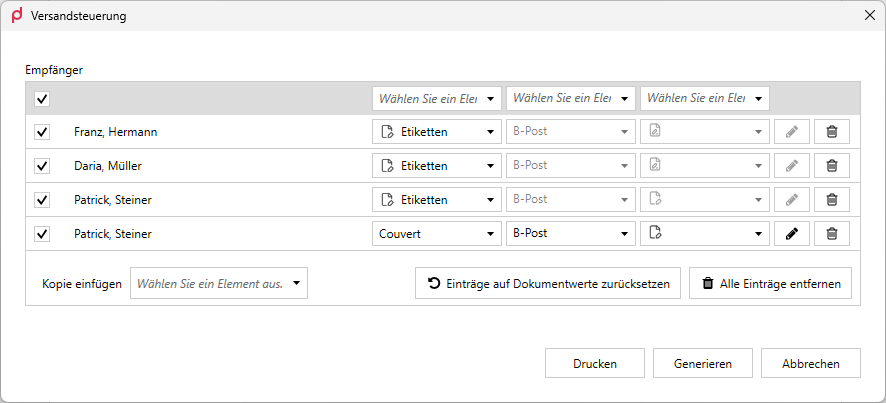
The Dispatch Manager dialog reads the recipients from the document and assigns them to targets such as labels.

A dedicated printer can be assigned per target, so documents go straight to the right devices.
Technical configuration details: Dispatch Manager (Successor Documents).
PowerPoint: from slide deck to sent mail
Presentations can now be sent directly from PowerPoint via Outlook (New). A preparation dialog controls what goes out: comments, hidden slides, or only a selection of slides. The e-mail uses a primedocs web template, so it is automatically in your corporate design. In addition, output management (output and DMS integration from the open document) is now also available in PowerPoint and Excel.
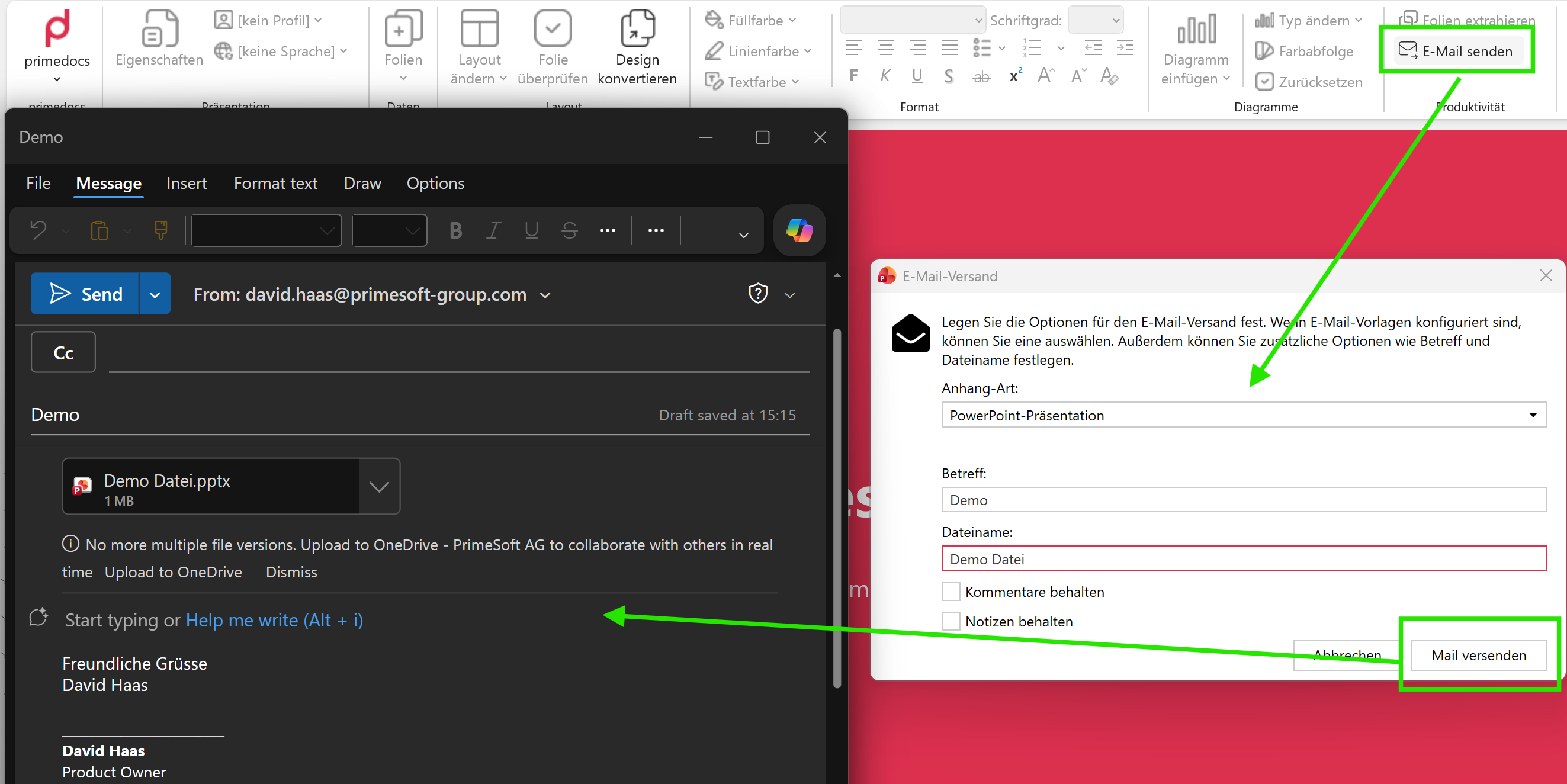
«Send e-mail» in the primedocs ribbon creates the ready-to-send Outlook (New) mail (left) and opens the e-mail dispatch dialog (right).
Additional profiles: roles instead of manual work
Additional profiles can now be managed through roles. Administrators define roles with localized display names and assign them to profiles, managed in the admin dashboard. In templates, the new forms attribute PreselectByRole automatically preselects the right profile, backwards compatible with the existing PreselectByIndex. This reduces maintenance effort and misconfiguration in organizations with many profiles.
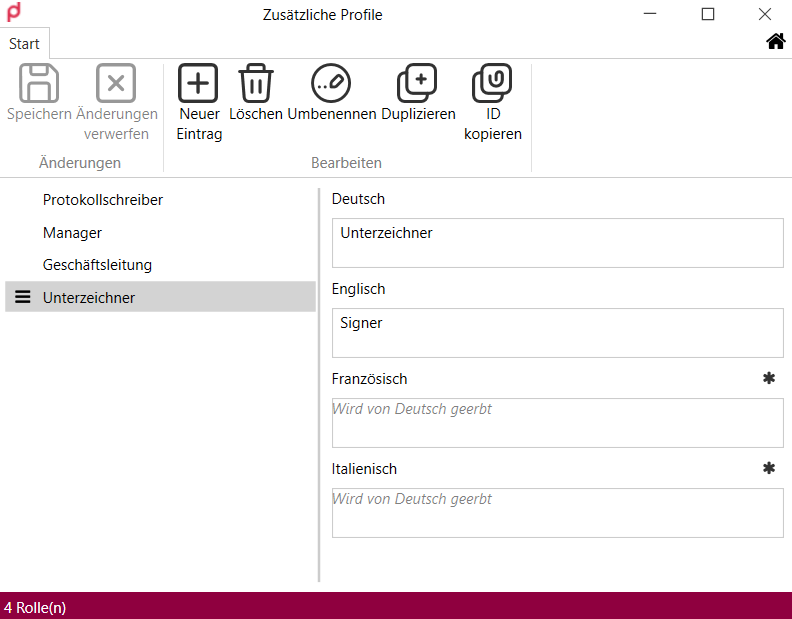
Create and manage roles with localized display names centrally.
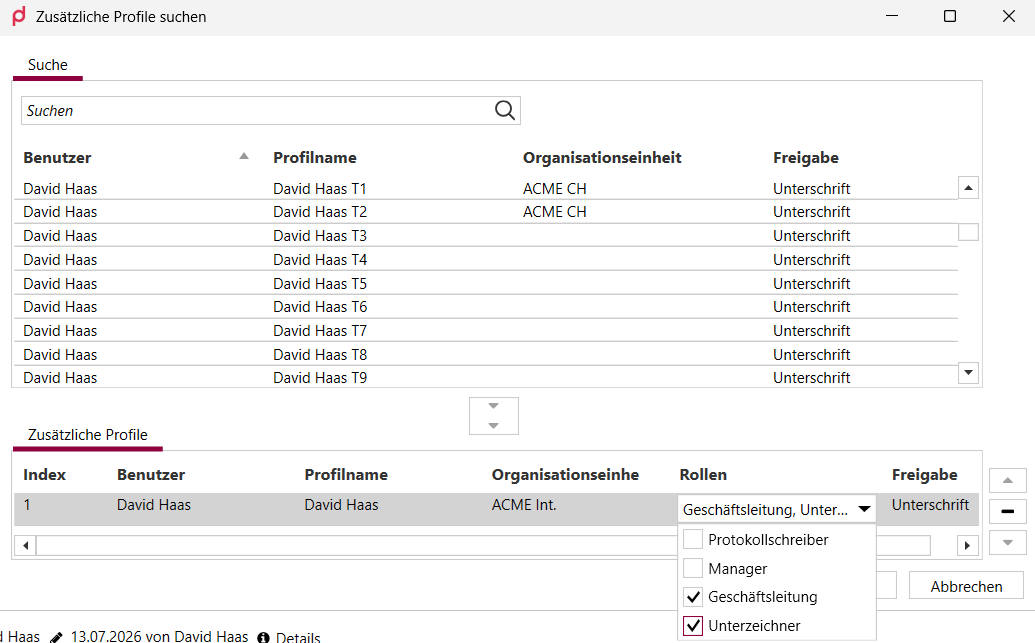
Assign roles to an additional profile. Templates then preselect them via PreselectByRole.
Snippets without boilerplate code
The snippet workflow for template designers is much leaner. When creating a WordContent or FormattedText snippet, fields are automatically converted to placeholders, and the new $.createAutoMapping() function generates the complete placeholder mapping as a one-liner. Repetitive mapping code per field is no longer needed.
All changes
Web app
New
- Tag search with AND/OR: Search now supports the «tags:» keyword with AND and OR conditions (semicolon and pipe) plus quotation marks for tags containing spaces. Case is ignored.
- Protection against data loss in dialogs: If an object dialog (e.g. «Create recipient») with unsaved changes is closed by clicking next to it, primedocs now asks before discarding your input. Applies to the web client and the web add-in.
Improved
- Smoother advanced search: The search overlay fades in and out gently and respects the «reduce motion» setting. The result list can be navigated with the arrow keys.
- Refreshed sign-in page: The sign-in and sign-out confirmation pages now match the web app design. A fallback link helps if the browser does not open the app automatically.
Fixed
- Clear message instead of a blank page: Accessing another user's profile without permission now shows a clear error message and keeps the navigation available.
- Sign-in in the Teams add-in: Signing in from the locally installed Teams app works reliably again.
- Language on first use: The interface sometimes started in French although the browser was set to German. Language detection has been corrected.
- Fields can be fully cleared: Saving a cleared user or profile field used to keep the old value. Clearing is now saved correctly.
- Templates from New Outlook visible on the web: Templates created in the desktop client for Outlook (New) did not appear in the web client. They are now shown.
- UI polish: Numerous display and usability fixes, including dark-mode contrast in pop-ups, duplicate scrollbars in the settings menu, keyboard focus handling, the theme switch, and layout details.
Office add-ins
New
- Send slides via Outlook (New): Send presentations directly from PowerPoint, with a preparation dialog (comments, notes, slide selection) and an e-mail template from the primedocs web templates. Selected slides can also be handed straight to the send flow via Extract slides.
- Output management in PowerPoint and Excel: Output and DMS integration from the open document are now also available in PowerPoint and Excel, including output without saving.
- Centrally controlled auto-signature (Outlook Classic): The
OutlookFeatureConfiglets you disable the auto-signature initially organization-wide (theAutoSignatureFunctionfeature). It remains enabled by default, and profile switching and campaigns work unchanged.
Improved
- More flexible ribbon configuration: Anchored groups such as «Undo» can now be hidden via
<HiddenRibbonElements>. Context-dependent ribbon configuration in Outlook now reliably distinguishes between mail and explorer context.
Fixed
- Snippets without an open document: Inserting or editing a snippet without an open document crashed Word. Fixed.
- Deleting multiple snippet groups: Deleting several selected groups at once had no effect. Works again.
- Creating and inserting snippets: In certain templates, snippets could neither be created nor inserted manually. Fixed.
- Campaign images in Outlook: Campaign templates inserting an image via a document function ran into a server-side timeout and the image was missing. Fixed.
- Outlook (New) signatures always up to date: Signatures were occasionally displayed stale due to browser or proxy caching. Delivery now prevents caching.
- Automatic activation in Outlook Classic: Event-based activation of the add-in works again.
- PowerPoint: placeholders and logos stay in place. Text placeholders slid behind images when a slide had several picture placeholders. Tagged logos (
BringToFrontIfOverlapped) moved when inserting slides or did not react when inserting images via the primedocs menu. All fixed. - Changing chart type: Changing the chart type with an organization unit's custom colours caused an error. Fixed.
- Excel headers stay intact: Updating certain Excel documents corrupted the header of the first sheet. Fixed.
- Clearly labelled preview buttons: The two preview buttons for testing Word templates were misleadingly labelled.
Templates & document creation
New
- Simplified snippet workflow: Fields are automatically converted to placeholders when creating WordContent and FormattedText snippets, and
$.createAutoMapping()generates the mapping automatically. - Template literals in fields JavaScript: Use
`Text ${expression}`to place variables directly in strings. - Serial and multi-letter on the web: The new web elements
<WebOutput>and<WebSeriesOutput>enable serial-letter generation in web templates. - Placeholders from the layout: Placeholders from the layout are now carried over into the content template.
Improved
- More consistent required fields: The required attribute now also applies to choice/dropdown fields and to additional profiles.
- Data providers without search parameters:
HttpDataProvider,ExistingListDataProviderandSqlDataProvidernow also work without configuredSearchParameters. Existing views are searched instead. - Multi-step search scenarios: In the provider pipeline, mapping is now possible at every step, including during search. This supports scenarios such as person, then addresses, then data fields.
- Clearer error messages: Error messages for problems in snippets and in fields JavaScript now contain more context about the cause.
Fixed
- Fields objects interpreted correctly: A fields object without
function main()was parsed incorrectly and produced confusing errors. Fixed. - Form dialog with date fields: The dialog crashed during a search as soon as an object contained a date field. Fixed.
- Pipeline results editable: Results from pipeline providers incorrectly remained read-only after being added. Fixed.
Administration & web admin
New
- Roles for additional profiles: Define roles with localized display names, assign them to additional profiles, and manage them. Templates can use the Forms attribute
PreselectByRole. - Initial values during user onboarding: An initial field value can now be defined for onboarding.
Improved
- Safely restore deleted templates: When restoring a template, primedocs now points out if the associated template group is deleted, including a restore action for the group.
- Consistent template permissions: A new health check finds and automatically cleans up invalid permission combinations.
- SID migration checks duplicates: The migration editor now prevents duplicate SIDs, validated on client and server.
Fixed
- Complete language transfer: The language transfer did not carry over the template document and preview into the new language. Now it does.
- Reliable global translations: Search returned wrong hits and the list did not show all entries. Both fixed.
- Export of large databases: The DacPac export aborted with a memory error for databases above 1 GB. Fixed.
- Correct version count: The template overview always showed 1 in the «Versions» column instead of the actual count. Fixed.
- Further dashboard fixes: Corrected the global-translations export hint, the «Mark as default template» flag during package import, and an overly strict health-check threshold for sparsely filled databases.
Integration & interfaces
New
- Server-side command execution:
InvokeUrlnow also runs server-side (Connect session, without a local client) and returns a structured result instead of just the file, including report endpoints and dialog support. - Connect Templates API: Find and filter templates for a profile (profile, language, template type). MetaTemplate IDs are now available via a public
/commonendpoint. - New
<ShowDialog>command: Shows a dialog with a definable message and an optional button after a command flow completes, available inOnSuccess,OnError,OnCancelandOnExit. InvokeUrlwith connected services: Authentication can now run via a connected service (ConnectedServiceKey) so documents are uploaded on the user's behalf.- Manage organization units via API: The AdminOrganizationUnit API now supports create, delete and filtered queries for automated management through external systems (see Important notes).
Improved
InvokeUrldetects the file format automatically: If the file name of aMultipartFormDataRequesthas no extension, the engine appends it automatically from the format being sent (.pdf,.docx,.xlsx,.pptx,.xml) and also derives theContent-Typefrom it when none is set.- More flexible Connect policies: Headers in a Connect policy are now optional.
Desktop client
New
- Dispatch Manager: The new Dispatch Manager dialog reads recipients from the document, assigns them to targets such as labels or envelopes, and generates bundled files per target. With print control: one printer per target, direct output, remembered selection.
- Live preview for Outlook (New) templates: The template editor for campaigns and signatures shows a real-time preview with profile- and language-based field resolution. Save with Ctrl+S.
- Live refresh in the editor: Changes to global fields or forms appear immediately in the autocomplete suggestions, without saving or switching context.
Improved
- Extended XML editor: Autocomplete suggests allowed values from XSD enumerations, images can be inserted as Base64 via a toolbar button, and syntax highlighting and bracket matching were corrected.
Fixed
- Stable when deleting templates: The client crashed when deleting a template that had both a published and a draft version. Fixed.
- Much smaller local cache: The local cache produced up to 500 MB of files per sign-in, critical on terminal servers. It now stays small and continuously cleans up after itself.
- Window position with multiple monitors: Window positioning in multi-monitor setups has been corrected.
- Minor fixes: Focus is placed directly in the name field after creating a template group. Improved language selection for group names.
Operations & installation
New
- Server applications on .NET 10: The server applications were migrated to .NET 10, as support for .NET 8 ends in November 2026 (see Important notes).
Improved
- Faster server API: Read queries use less memory and respond faster.
- Monitoring with server version: The detailed health status now also reports the server version.
Fixed
- Upload of very large template packages: Synchronization errors occurred when uploading packages of several hundred MB. Fixed.
- Stable sign-in in the Outlook web add-in: Parallel token refreshes led to sign-in errors. Fixed.
- IdentityServer maintenance error: An error occurred while removing expired credentials. The installation script now updates the affected component automatically.
Important notes
Renamed Office properties: The GlobalCoreProperty and GlobalCustomProperty entries in the OfficeProperties module are now correctly named GlobalCoreProperties and GlobalCustomProperties (plural). Existing configurations using the old names must be adjusted.
AdminOrganizationUnit API: The API was extended with create, delete and filtered queries and adjusted in the process. Review existing integrations using this endpoint before updating.
.NET 10: The server applications are now based on .NET 10. Before updating, the .NET 10 Windows Hosting Bundle (ASP.NET Core Runtime) must be installed on the server. The primedocs installation script checks this prerequisite but does not install the runtime itself. See the update guide.
Removed configuration setting: The unused StreamBufferSizeInBytes setting was removed from the primedocs.config. If your configuration still sets this key, review it after the update and remove the entry.