Groups
In primedocs, groups control the visibility of templates and Snippets as well as the assignment of roles and permissions. A template can be visible "to everyone" or only to a specific group — controlling access via groups requires considerably less maintenance than individual permissions.
primedocs distinguishes two types of groups: Windows groups (AD) and primedocs groups. Both are managed in the Admin Dashboard under Security.
Windows groups (Active Directory / Entra ID)
Under Windows Groups in the Admin Dashboard, the Active Directory groups that are to be targeted in primedocs are listed.
Not all AD groups are loaded into primedocs, only those you actually want to use in primedocs — for example, to control the visibility of templates or Snippets. This keeps the configuration clear.
Updating renamed AD groups
primedocs identifies a Windows group by its SID. The group name is taken over once when the group is loaded and is then only kept as metadata — a rename in Active Directory is not propagated to primedocs automatically. Permissions and visibility remain correct because the SID does not change, but the old name is still displayed.
The name can be updated manually in the Admin Dashboard:
-
Open the Security area in the Admin Dashboard.
-
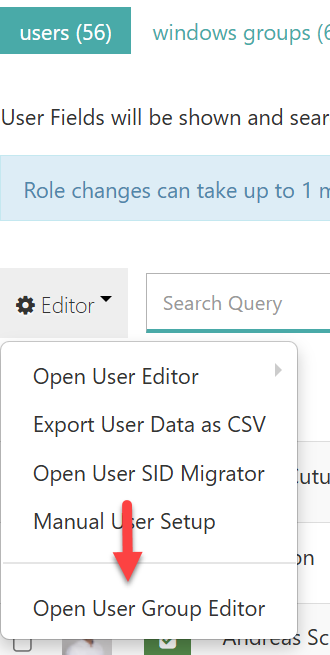
On the users tab, open the Editor menu and select Open User Group Editor.
-
Enter the new name in the Title column of the group's row. The SID column is read-only and remains unchanged.
-
Save with Save User Group Data.
Making the new name visible on desktop clients
After saving, primedocs Desktop still shows the old group name for templates and Snippets. A regular synchronisation does not detect the rename, because the group name is not recorded as a change relevant to synchronisation. Only a full sync with a cleared local cache downloads the new name:
- Open the Account area in the primedocs client.
- Transfer pending changes with Synchronize.
- Under Change data source, click Reset data source and restart primedocs.
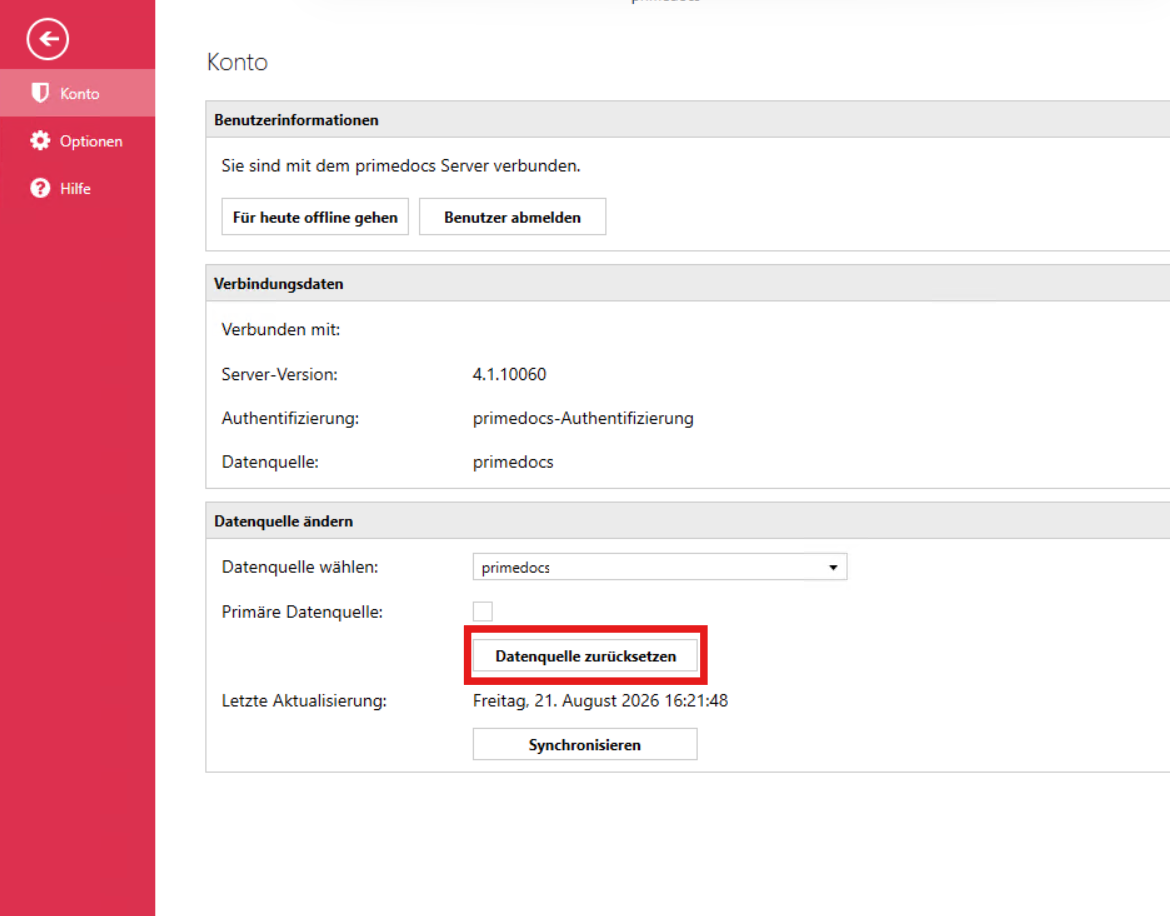
Reset data source discards unsynchronised changes and then requests all data from the server again. Synchronize pending changes beforehand.
primedocs groups
primedocs groups are intended as a supplement to the AD groups for the case where a group is needed that is not available as an AD group or may not be created there.
A primedocs group can contain:
- individual primedocs users,
- AD groups,
- further primedocs groups.
Membership can be defined statically or made dynamic via a configuration. With dynamic groups, a stored configuration automatically assigns users to the group based on their user information, or removes them again.
Configuring dynamic groups
The configuration of a dynamic group is stored directly on the primedocs group (in the Admin Dashboard under Security → primedocs Groups). It consists of a short JavaScript expression with a main() function that must return a boolean:
- If
main()returnstruefor a user, the user is added to the group. - If it returns
false, the user is removed from the group.
User fields are accessed via $('FieldId'). The evaluation considers the active text and checkbox fields of the user (the configurable user fields, e.g. User.Department). Standard fields such as the display name are not available.
Examples:
// Include all users
function main() { return true; }
// Only users in the "Sales" department
function main() { return $('User.Department') === 'Sales'; }
// Evaluate a checkbox field
function main() { return $('User.Special'); }
The assignment is carried out by a background job — once when the user is created and periodically thereafter. The time of the last run and its result (success or error) are recorded per group and monitored by the Health Monitor.
Recommendation
- Control visibility and permissions via groups rather than via individual users wherever possible — individual permissions involve considerable manual maintenance effort.
- Load only the AD groups that you really need in primedocs.
- Use primedocs groups when the desired grouping cannot be represented in the Active Directory.
See also: Roles and Users, Profiles & Organisations.