System Overview
primedocs is a multi-layered platform made up of several server services, a central authentication service, multiple databases, and various clients (touchpoints). The following overview shows how these components work together and what role each of them plays.
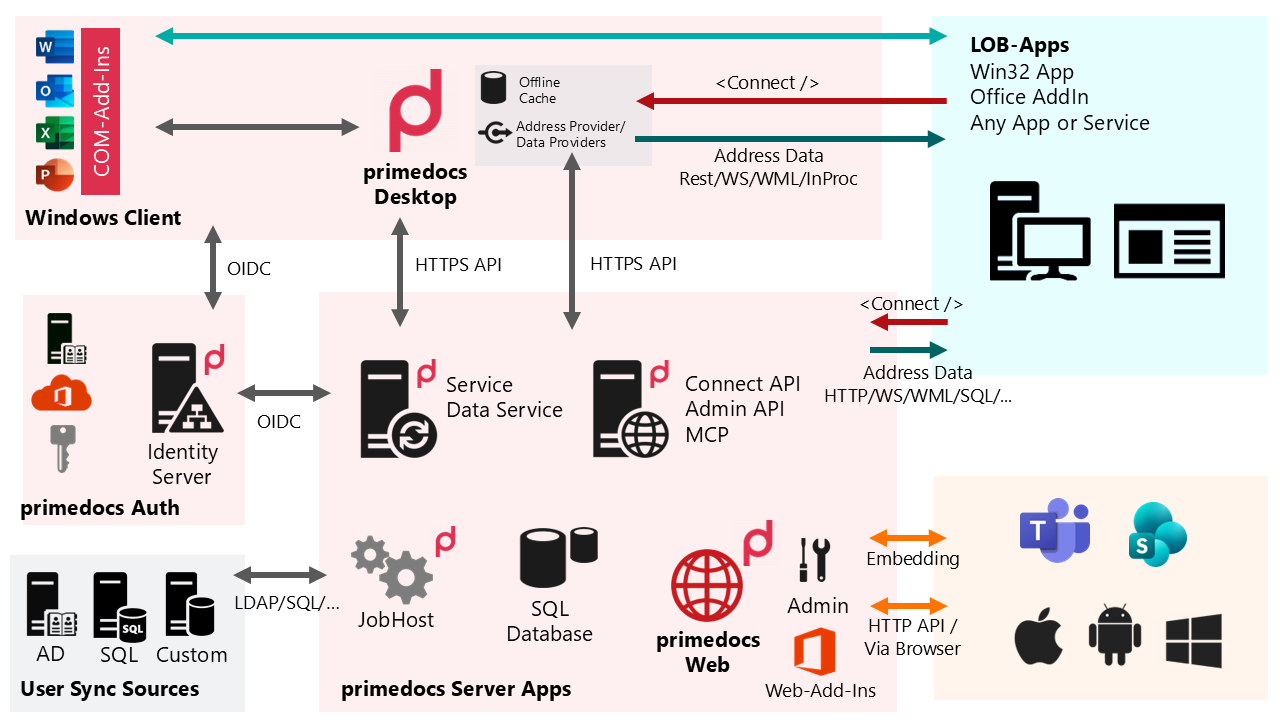
Clients (touchpoints)
| Component | Role |
|---|---|
| primedocs Web (React web app) | The main UI outside of Office. Communicates with the server through the Web API. |
| Office Web Add-ins (Office.js) | In-Office integration for Word, Excel, PowerPoint, and Outlook — in the browser, on macOS, and on Windows. |
| primedocs Desktop (WPF Windows client) | Windows client with a local offline cache (ESENT) and address/data providers. Signs in against the Identity Server via OIDC and synchronizes through the sync service. |
| Office COM Add-ins (VSTO) | Legacy Office integration on Windows; being replaced by the Web Add-ins. |
| Web Admin | Web interface for managing data sources, templates, users, and permissions. |
Server components (primedocs Server Apps)
| Component | Role |
|---|---|
Web API (PrimeDocs.Web.WebApi) | Versioned REST interface — the central HTTP API for the web touchpoints and for third-party systems. Versioned without breaking changes. |
Sync Service (PrimeDocs.Service.Host) | Synchronizes data for the desktop client (offline cache). Backward compatibility is mandatory. |
| Data Service | Delivers address and master data through the configured address providers to the client and server. |
| Document Creation Server (DCS) | Server-side document generation — creates documents without client involvement, e.g. from third-party systems via the Connect interface. |
| JobHost | Runs background jobs: provisioning/synchronization, import/export, scheduled tasks. |
| Document Engine | Generation pipeline (chain of responsibility) for Word, Excel, PowerPoint, and Outlook. Runs both server-side and in the client. See Document Generation. |
MCP Server (PrimeDocs.Web.Mcp) | Model Context Protocol server through which AI agents (e.g. Microsoft 365 Copilot) can invoke primedocs functions. See MCP integration. |
Authentication
| Component | Role |
|---|---|
Identity Server (IdS) (PrimeDocs.IdentityServer.CustomerHost) | Central authentication via OIDC/OAuth 2.0 and JWT. Connects external identity sources (Microsoft Entra ID, Active Directory, Microsoft 365). All clients and server services authenticate against the IdS. |
Databases (SQL Server)
primedocs distinguishes between tenant-specific and instance-wide data:
| Database | Content |
|---|---|
Datasource database (PrimeDocsContext) | One instance per datasource (tenant): templates, snippets, users, profiles, organizational units, and permissions. |
Operations database (OperationContext) | Instance-wide data: tokens, logging, and SCIM provisioning data (users, groups, requests). Also holds the Identity Server store (configuration and persisted grants) — physically the same database, with separate migration tracking. |
Data sources and synchronization
| Component | Role |
|---|---|
| Address Provider (AP) | Pluggable data sources for address and master data (LDAP, CRM, SharePoint, HTTP, SQL, etc.) through the Select interface. |
| User synchronization | Provisions users from AD, SQL, or custom sources — via LDAP/SQL/HTTP and SCIM. |
External systems (LOB apps)
Third-party systems — Win32 applications, Office add-ins, or any service — integrate with primedocs in two ways: the Connect interface (XML-based, for automating document generation) and the Web API (REST). The SharePoint Connector is available in addition. Access is possible across platforms (browser, Windows, macOS, Android).
In this section
- Document Generation — how the Document Engine turns a template and data into a document.
- Users, Profiles & Organizations — the data model around users and tenants.
- Dashboard — the administrative web interface.
- Languages — the language and localization concept.