Global Translations
All language-dependent texts (translations) that can be linked in XML configurations are stored in the Global Translations.
References
The translations are located in data sets (data tag), which in turn are located in groups (group tag). The content in a data set is linked in a configuration according to the following pattern:
{D/U[GroupName.DataName]}.
The language may depend on:
- Document language → "D" →
{D[GroupName.DataName]} - UI language → "U" →
{U[GroupName.DataName]}
Example
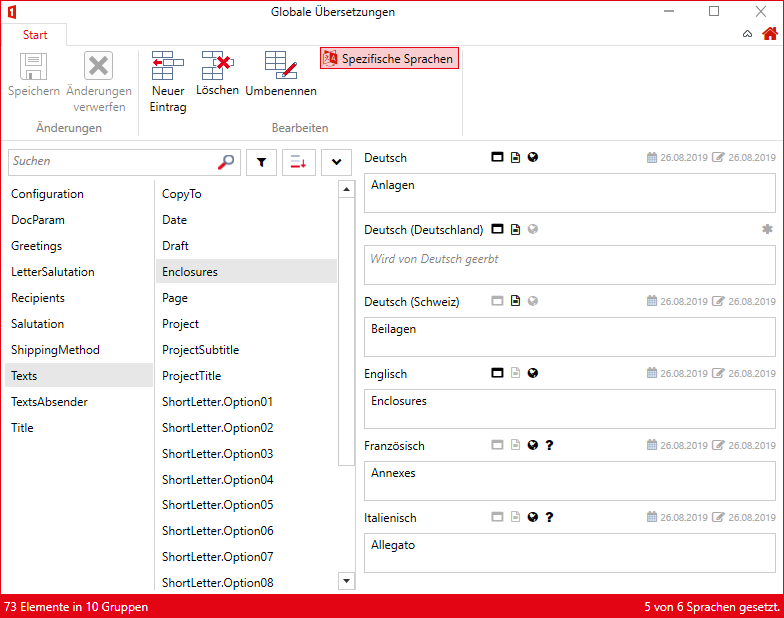
The globally stored record "Texts.Enclosures" contains different values depending on the language:
Screenshot
Underlying XML
<TranslationMap>
  <group name="Texts">
    <data name="Enclosures">
      <value lcid="07">Anlagen</value>
      <value lcid="2055">Beilagen</value>
      <value lcid="12">Annexes</value>
      <value lcid="09">Enclosures</value>
      <value lcid="16">Allegato</value>
    </data>
    [...]
  </group>
  [...]
</TranslationMap>
The lcid attribute contains the language code as a Windows LCID in decimal notation: short forms such as 07 denote the primary language code (in the example: 07 = German, 09 = English, 12 = French, 16 = Italian), long forms such as 2055 a specific language variant (2055 = German, Switzerland).
Usage in Templates
Translated texts cannot be inserted directly into templates. In order for the texts to be used in the template, the references must always be inserted into a field (web-enabled templates) or a script (classic templates). More information about the template types can be found here.
Web-Enabled Templates
To access translations, the prefix translate- can be used in the respective document function. For example, in the document function Fields:
<FieldsConfiguration>
  <Fields>
    <Text Name="Page" translate-Value="Texts.Enclosures" />
  </Fields>
</FieldsConfiguration>
In Code elements, the translations are additionally available via the translations API, e.g. $.translations.getText("Texts.Enclosures").
classic Templates
The translated "Texts.Enclosures" record can be linked in all XML configurations of the document functions using the pattern {D[...]} or {U[...]} (see References). For example, in an enclosure script in the Scripts document function:
<CustomDataNode id="Enclosures">
<Line>
<Text>{D[Texts.Enclosures]}:</Text>
</Line>
<Line>
<Element id="DocParam.Enclosures" linePrefix="–	" />
</Line>
</CustomDataNode>
{D[Texts.Enclosures]} is now replaced with "Anlagen", "Beilagen", "Enclosures", "Annexes" or "Allegato" respectively, depending on the document language.
FormattedText translations
A translation entry does not have to be plain text. It can also hold HTML — then it is a translation of type FormattedText. This allows paragraphs, character formatting, lists and Word styles to be stored directly in the translation instead of creating a snippet for them.
Such a translation is retrieved in Code through getFormattedText rather than getText:
$.translations.getFormattedText("Texts.Remark")
Placeholders in the HTML
The HTML of a FormattedText translation may contain Handlebars placeholders, which are filled with named parameters on retrieval:
{{#if content}}
<p data-word-style-id="Quote">{{content}}</p>
{{/if}}
$.translations.getFormattedText("Texts.Remark", { content: $("Forms.Remarks") })
The condition {{#if content}} ensures that an empty field produces no empty paragraph: primedocs treats an empty value as «not set», and the whole block is dropped.
The full syntax — placeholders, conditions, loops and the restrictions on attributes — is described under Placeholders, Loops and Conditions.
A common pattern: outputting a field inside a snippet
Technically a snippet contains only placeholders, never fields. A field value therefore reaches a snippet by way of a FormattedText translation:
- Place a snippet block placeholder in the snippet.
- Create a FormattedText translation containing
{{content}}in the Global Translations — with the desired Word style and, if the value is optional, wrapped in{{#if content}}. - When inserting the snippet, pass the translation as the placeholder's value and supply the field there:
$.snippets.getWordContent("CoverLetter", {
  "Remark": $.translations.getFormattedText("Texts.Remark", { content: $("Forms.Remarks") })
})
The formatting stays language-dependent and centrally maintained, while the content comes from the field.
Automatic Translations with AI
Prerequisites
- An AI endpoint must be configured in
primedocs.config. - The primedocs Client must be actively connected and online
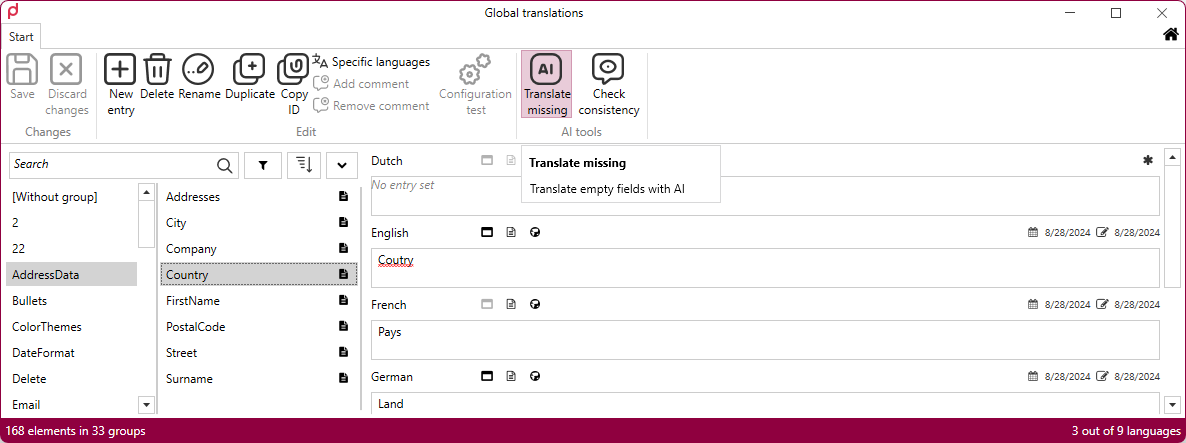
Under these conditions, additional buttons with the corresponding functions appear in the top right corner.
Functions
- Translate Missing: Sends the existing entries to the AI with the instruction to complete the empty entries. The first entry in the list is treated as the source of truth. All visible, empty fields will be filled in. Already filled fields are ignored.
- Check Translations: Sends the existing entries to the AI with the instruction to check them for correctness.
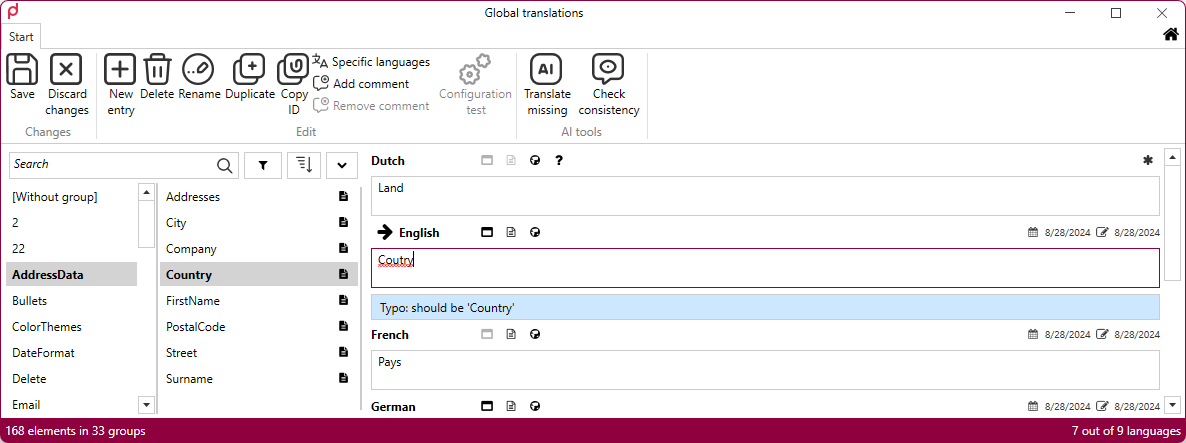
The status of AI operations is displayed in the bottom right corner.