CodeDataProvider
The CodeDataProvider supplies the data of an Object or ObjectCollection from a JavaScript snippet, instead of loading it from an external source (CSV, Excel, SQL, HTTP). It is useful for providing entries that are computed, derived from the entered search parameters, or taken from the Connect data context.
The CodeDataProvider uses the same mechanism as the other DataProviders and is available both in the primedocs desktop client and in primedocs Web.
Configuration
<ObjectCollection Id="Positions" Label="Line items">
  <Schema>
    <Text Id="Article" Label="Article" />
    <Text Id="Amount" Label="Amount" />
  </Schema>
  <DataProviders>
    <CodeDataProvider DisplayName="From Connect data">
      <SearchParameters>
        <Text Id="Category" Label="Category" field-Value="Data.Category" />
      </SearchParameters>
      <Code>
        var category = $("Category");
        [
          { Article: "Example " + category, Amount: "100.00" }
        ]
      </Code>
    </CodeDataProvider>
  </DataProviders>
</ObjectCollection>
Unlike the file-based or HTTP providers, the CodeDataProvider needs no Mapping: the properties of the objects returned by the snippet are matched to the Schema fields by name. Nested objects are flattened with dot notation (e.g. Address.City).
Attributes
| Attribute | Description |
|---|---|
DisplayName / translate-DisplayName (optional) | Display name of the provider in the UI. |
ReadOnly (optional) | When true, the fields loaded via this provider are read-only. |
AutoAddAllEntries (optional) | When true, all entries returned by the snippet are added to the collection automatically. |
Elements
| Element | Description |
|---|---|
Code (required) | JavaScript expression whose value provides the entries: an array of objects (for ObjectCollection) or a single object (for Object). Each object is an entry; its properties become fields. The expression may span multiple lines (leading var declarations, etc.); the value of the last expression is what counts. No main() or return wrapper is needed. |
SearchParameters (optional) | Search mask with Text, Date, YesNo, Choice (as in Forms). Use field-Value (value from the Connect data context) or parent-Value (field of the parent object) to pre-populate parameters. |
JavaScript API
The $ object is available inside the Code snippet:
| Call | Description |
|---|---|
$.parameter("Id") or $("Id") | Value of a configured search parameter. |
$("Data.Key") | Value from the Connect data context. |
$.parent("FieldId") | Value of a field of the parent object (in nested Object/ObjectCollection structures). |
The CodeDataProvider does not participate in the Loading path of the ProviderPipeline, as it has no flat search step that could be re-mapped on load.
Example: searching supplied Connect data
This example searches data supplied with the Connect call and offers it as a filtered choice list. The data source stays authoritative: ReadOnly="true" makes the adopted fields read-only, and DisableManualCreate="true" prevents users from creating their own entries manually.
<FormsConfiguration>
  <Elements>
    <ObjectCollection Id="SelectedLocations" Label="Locations">
      <Schema>
        <Text Id="Company" Label="Company" />
        <Text Id="Street" Label="Street" />
        <Text Id="PostalCode" Label="Postal code" />
        <Text Id="City" Label="City" />
        <Text Id="Country" Label="Country" />
      </Schema>
      <DataProviders DisableManualCreate="true">
        <CodeDataProvider DisplayName="Find location" ReadOnly="true" AutoAddAllEntries="false">
          <SearchParameters>
            <Text Id="query" Label="Company, city or postal code" />
            <Text Id="country" Label="Country code" field-Value="Data.DefaultCountry" />
          </SearchParameters>
          <Code><![CDATA[
            $('Data.Locations')
                .filter(function (location) {
                    var query = $('query').toLowerCase();
                    var country = $('country').toUpperCase();

                    var text = (
                        location.Company + ' ' +
                        location.PostalCode + ' ' +
                        location.City
                    ).toLowerCase();

                    return (query === '' || text.indexOf(query) >= 0)
                        && (country === '' || location.Country === country);
                })
          ]]></Code>
        </CodeDataProvider>
      </DataProviders>
    </ObjectCollection>
  </Elements>
</FormsConfiguration>
The Code expression sits inside a <![CDATA[ … ]]> block so that characters such as <, > and & (e.g. in >= or &&) are not interpreted as XML.
The country search parameter is pre-populated from the Connect data context via field-Value="Data.DefaultCountry". Through $('Data.Locations') the snippet reads the supplied object collection, filters it against the entered search parameters ($('query'), $('country')), and returns the filtered objects directly. Their properties (Company, Street, etc.) are matched to the Schema fields by name — no manual remapping is required.
A matching Connect call that supplies DefaultCountry and the Locations collection:
<primedocsConnect>
  <Data>
    <Value Key="DefaultCountry">CH</Value>

    <ObjectCollection Key="Locations">
      <Item>
        <Value Key="Company">PrimeSoft AG</Value>
        <Value Key="Street">Bahnhofstrasse 4</Value>
        <Value Key="PostalCode">8630</Value>
        <Value Key="City">Baar</Value>
        <Value Key="Country">CH</Value>
      </Item>

      <Item>
        <Value Key="Company">Alpine Legal AG</Value>
        <Value Key="Street">Bundesplatz 1</Value>
        <Value Key="PostalCode">3011</Value>
        <Value Key="City">Bern</Value>
        <Value Key="Country">CH</Value>
      </Item>

      <Item>
        <Value Key="Company">Acme Deutschland GmbH</Value>
        <Value Key="Street">Leopoldstrasse 10</Value>
        <Value Key="PostalCode">80802</Value>
        <Value Key="City">München</Value>
        <Value Key="Country">DE</Value>
      </Item>
    </ObjectCollection>
  </Data>
</primedocsConnect>
A search for Prime then returns exactly one match:
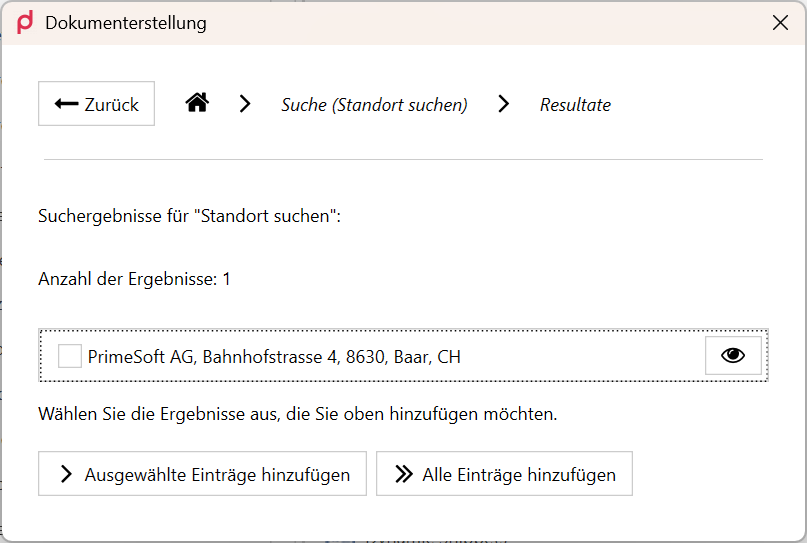
Searching for "Prime" in the supplied Connect location data — one match, adopted read-only.