Connected Services
A Connected Service is a configured external service that primedocs authenticates against on the user's behalf (e.g. via an OAuth login). Instead of storing credentials in individual configurations, the features reference a connected service through its ConnectedServiceKey. The user signs in once per service and the session is then reused.
Connected services are managed by the datasource administrator (name, key, endpoints). Each service has a unique Key, a display name, and a per-user sign-in state.
Configuration in the DataSourceAdminApp
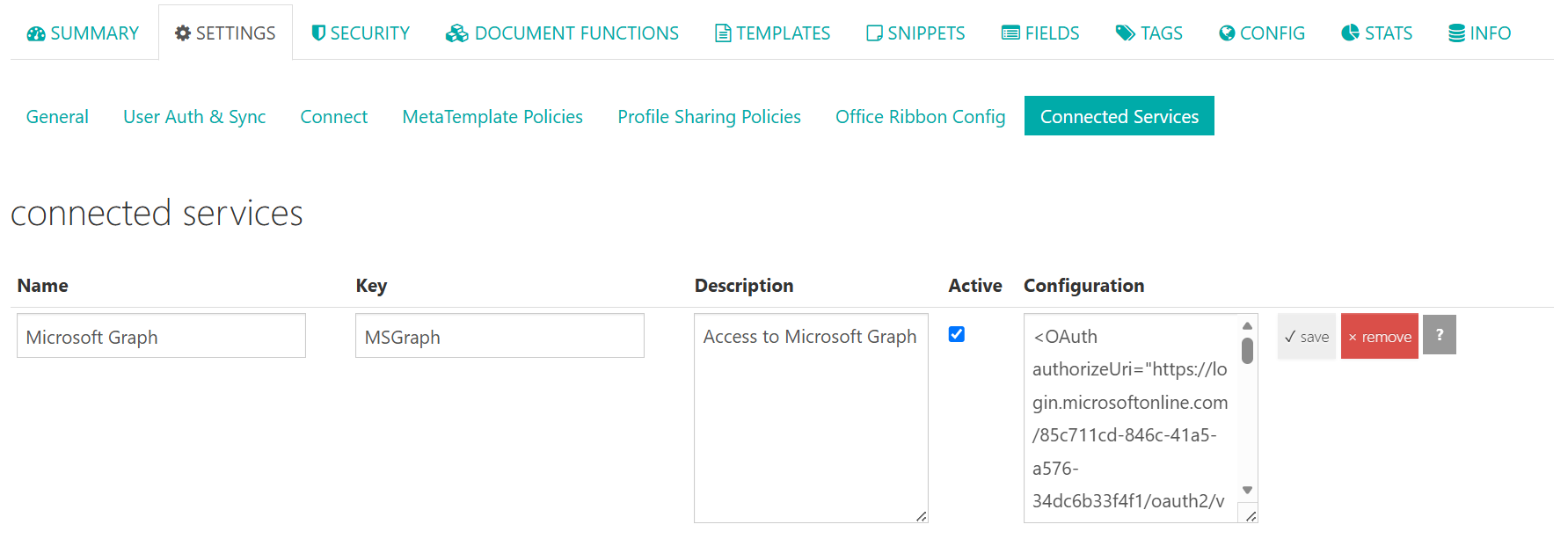
Connected services are managed in the DataSourceAdminApp (Dashboard) under Settings → Connected Services. The following fields are maintained per service:
| Field | Description |
|---|---|
| Name | Display name of the service. |
| Key | Unique key by which functions reference the service (ConnectedServiceKey). |
| Description | Optional description. |
| Active | Enables or disables the service. |
| Configuration | XML configuration of the service (see OAuth configuration). |
OAuth configuration
The Configuration of a connected service is an <OAuth> element. It supports the following attributes:
| Attribute | Required | Description |
|---|---|---|
authorizeUri | Yes | Authorization endpoint of the external service (base URL for the login redirect). |
tokenUri | Yes | Token endpoint for exchanging the authorization code for an access token and for token refresh. |
issuer | No | HTTPS issuer identifier of the provider (e.g. https://login.microsoftonline.com/{tenant-id}/v2.0). Required only for showing the signed-in account; it must match the ID token and the discovery metadata exactly. |
clientId | Yes | OAuth client/application ID. |
clientSecret | No | OAuth client secret. Only sent if set (public/PKCE clients without a secret are supported). |
scope | No | Requested scopes as a space-separated string (e.g. email openid profile People.Read). |
accountDisplayNameClaims | No | Custom claim names for showing the signed-in account, separated by spaces or commas; the order defines the priority. If omitted, the default claims apply. |
In addition, the <OAuth> element can contain one or more <UrlPattern> child elements. A UrlPattern is a URL pattern (e.g. https://graph.microsoft.com/*) that defines for which outbound requests this service's token is used.
<OAuth
  authorizeUri="https://login.microsoftonline.com/{tenant-id}/oauth2/v2.0/authorize"
  tokenUri="https://login.microsoftonline.com/{tenant-id}/oauth2/v2.0/token"
  issuer="https://login.microsoftonline.com/{tenant-id}/v2.0"
  clientId="00000000-0000-0000-0000-000000000000"
  clientSecret="…"
  scope="email openid profile People.Read">
    <UrlPattern>https://graph.microsoft.com/*</UrlPattern>
</OAuth>
response_type=code, code_challenge_method=S256 (PKCE), redirect_uri and the state are generated by primedocs at runtime and are not attributes of the <OAuth> element.
How it works (OAuth 2.0)
Connected services use the OAuth 2.0 authorization code flow:
- A feature (e.g. HttpDataProvider or an InvokeUrl command) references a connected service via
ConnectedServiceKey. - If the user is not yet signed in to that service, primedocs Web redirects them to the external service's authorization endpoint.
- After a successful sign-in, the service calls primedocs' callback URL; primedocs exchanges the code for an access token and stores it server-side per user and service.
- Subsequent calls reuse (or refresh) the stored token automatically.
Registration with the external service
When registering the primedocs application with the external service (e.g. as an app registration), the following redirect/callback URI must be configured:
https://{instance}/app/connectedservices/oauthcallback
This URI is fixed per instance (not per connected service): it is composed of the base URL of the primedocs Web App (typically https://{instance}/app) and the fixed path /connectedservices/oauthcallback. This exact value is sent as the redirect_uri to the authorization endpoint at runtime and must be registered with the external service exactly as shown.
The OAuth state internally carries the correlation information (signed-in user/login, the connected service involved and the datasource) so primedocs can map the callback to the right context.
After processing the callback, primedocs redirects the browser internally to a status page (.../app/web/connectedservices/connectedservice-oauthcallback). This internal redirect is not the redirect URI to register with the external service.
"Login required"
When a feature accesses a connected service the user is not yet signed in to, primedocs Web shows a sign-in banner. Only after a successful sign-in is the action (e.g. document generation or data retrieval) carried out.
Showing the signed-in account
For each service, primedocs Web shows which external account the user is signed in with — in the service row while the sign-in is active, and as a dimmed "Last signed in" hint once the connection has expired (also in the "Login required" dialog). If no account is known, nothing is shown.
Prerequisites per service:
- The scope contains
openid profile(emailonly with providers that support it). - The
issuerattribute is set to the provider's exact HTTPS issuer identifier.
The account name is derived from the ID token claims, in this order: email, preferred_username, upn, unique_name, name — the first non-empty value wins. If a provider uses different claims, the order can be overridden via accountDisplayNameClaims:
<OAuth … accountDisplayNameClaims="login_name displayName" />
If the ID token carries no usable claim, primedocs queries the provider's UserInfo endpoint once while connecting (taken from the discovery metadata).
Existing connected services only show an account after a manual update: set issuer and add openid profile to the scope. A changed scope can prompt users for consent on their next sign-in; in addition, users have to sign in again once before the account becomes visible.
The ID token is validated in full — including its signature against the signing keys published via OIDC discovery. The access token is never inspected for this. If the provider is slow or unreachable, the sign-in still succeeds; only the account is then not shown.
Usage
A connected service is referenced via the ConnectedServiceKey attribute. The following places support connected services:
| Used in | Description |
|---|---|
| InvokeUrl command | Authenticates the multi-step HTTP calls after document generation. |
| HttpDataProvider | Authenticates data retrieval from an HTTP/REST API. |
| Connect Session / Connect Session Templates | Authenticates a session's initializers and InvokeUrl commands — execution (/Execute) runs in the context of the signed-in user. |
<HttpDataProvider DisplayName="CRM" ConnectedServiceKey="Crm.OAuth">
  ...
</HttpDataProvider>
Using the access token
Within a configuration that references a connected service, the access token can be inserted via the {__ConnectedService.AccessToken__} placeholder — typically in the Authorization header. primedocs replaces the placeholder at runtime with the signed-in user's valid token:
<HttpDataProvider DisplayName="CRM" ConnectedServiceKey="Crm.OAuth">
  <Configuration>
    <Step>
      <Request Method="Get">
        <Url>https://crm.example.com/api/contacts</Url>
        <Header Name="Authorization" Value="Bearer {__ConnectedService.AccessToken__}" />
      </Request>
    </Step>
  </Configuration>
</HttpDataProvider>
System-reserved services
Certain services are reserved by the system and carry the _System. prefix (marked with a "System" badge in the UI). Currently:
| Key | Purpose |
|---|---|
_System.MIP | Microsoft Information Protection — retrieval of sensitivity labels. |
_System.MIP.Protection | MIP rights protection (Rights Management); prerequisite for EnableProtection of the MIP document function. |